Showing posts with label photography. Show all posts

Improving My Photography: Wait For the Moment

Tip #1: Wait For the Moment

I have heard this advice repeatedly yet it's been difficult for me to put into practice. One of my biggest obstacles, beyond my impatience, is that I don't make photography my priority. Rather. I take my camera on my walk, or take my camera on my vacation, or take my camera to record the moment; a moment I don't even wait for!

So out I headed with my iPhone and photography as my priority. The following illustrates my best example of the snapshot versus waiting. 


Two kids sit looking at books. 


The moment when his sister puts a book in a bin outside the door causing the small boy to glance up. 

The first is a nice photo without a compelling story. In the second a story is waiting to be told.  


Downy Woodpecker tummy-to-tummy with Red-bellied Woodpecker


While many people easily confuse the Downy and Hairy Woodpecker when not seen side-by-side, I doubt if there’s much confusion over the Downy (on the left) and Red-bellied (on the right, with no red belly). Regardless, their bird feeder stand-off allows an easy tummy-to-tummy, as it were, comparison.

Night Skys


Picnic, check. Beach blanket, check. Forecast for clear skies and northern lights, check, check! Having read about the fickleness of clear skies and northern lights even when they are predicted, we headed to the beach early to enjoy the rippled sand and sunset. Any northern light sighting would be considered a bonus.

 The textures of the dune grass, sand flats and mottled western sky all beckoned to me and my camera saying, “hey, no need to wait for some elusive northern lights, look at our show."

What a show indeed. The deep oranges of the setting sun reflected off every surface and reminded me of one of the pleasures of summer camp— lake sunsets that never grow old.

Every evening campers and counselors drift to the water’s edge in ones or twos or threes to watch the sun’s departing show. While artificial lights creep across our cities and suburbs, camp life celebrates natural darkness where only the occasional flashlight interrupts the moonlight dancing across the lake. Looking up into a star-studded sky and seeing a satellite slowing arcing past or spotting a shooting star or recognizing a constellation by name are gifts campers receive each summer.


These were the memories that flitted through my mind as I sat on the beach gazing north over the dark ocean, waiting expectantly for the northern lights. Was there a green glow above the horizon? Possibly. Was it the aurora borealis? Possibly, or possibly my imagination.

We looked up at the Big Dipper and Cassiopeia, enjoying the darkness and quiet. We may or may not have seen an the northern lights, but like a summer night at camp, we thoroughly enjoyed the delights of the night sky.

Photo Tips for Nonprofits to Share

Photo FAQs for Non-Profit Photos

Selfie of the pope?  Not too interesting.  Photo of the Pope taking a selfie?  That’s a story!

Most non-profits are always looking for new photos for a newsletter, a website, a Facebook page, slideshows, or possibly even to send to a local paper. In general, photos are needed whenever someone says, “Do you have a photo for this?”

It's likely that many of your volunteers have a Smartphone or a camera on hand.  So here are some tips to share with your volunteers and hopefully you'll receive higher quality photos in return.

Do you need me to take photos?
Yes! Non-profit photos, like most good photographs, need to tell a story.  So take photos for us and help us share the story of our organization.  

Do I need to get permission?
Generally permission is not needed for photos taken in public places, however, non-profits should have specific guidelines on whose likeness can be used in different media whether online or in print.  Find those guidelines and share them with your volunteers.

What are the key considerations to getting a good photo that we can use?
Two elements that turn good photos into great photos are composition and lighting.  
Compose your photo to tell the story.  For non-profit photos, what is the story you are trying to tell?  Do you want to show a student studying, a group raising a wall into place, a ranger giving a talk on a native species?  Are these just smiling faces or are these smiling faces building a house?Is this person walking in the snow, or is this person walking in the snow on a college tour?  Are these children laughing together or are they laughing as they use the new backpacks your group just donated?  

However, don’t get so far away that the you lose the personality of the subjects. If you’re unsure of the best composition, take 2 photos—one close up and one farther away with the subject off center and the background identifying the story we are sharing.  Take the time to move yourself, your subject or stuff to avoid extraneous items in the background.

Lighting is also critical, most especially for any photos that will be shared in print, such as in a physical newsletter.   Take the time to position yourself and your camera so you'll have the best light for the subject.  Generally the light should be on the face for people shots, but you don’t want your subject squinting into the sun.  A shady location on a bright sunny day works well.  Sunlight reflecting off of water or snow onto a face works well.

How can I get great indoor photos at a concert or sporting event?
Indoor action shots are hard.  You are welcome to try to capture photos of the basketball game your group sponsored or the solo in the orchestra for which your group donated instruments, but often between the lack of bright lighting, the movement and the distance you aren’t going to get a photo we can use in a wide variety of settings unless you don’t need to be reading this FAQ.  

However, take the photos and send them knowing we may not be able to use them.  
So ALSO take a pre or post-game/performance still shot.  Get a couple of the performers or teammates together with a prop such as an instrument, an actual stage prop or sports equipment.  Have them be silly or at a minimum create a composition other than a line-up: two players each holding on to a basketball, violinist pretending to play: show the story.

Should I take action photos or staged photos?
Action and candid shots are great to get when possible.  When you take a candid shot the subject is candid—the photographer can be prepared!  Think about where you are standing, where the subject will be, what the lighting will be like, what’s in the background etc.  
Make staged photos interesting, read the answer to the preceding question.

Will my iPhone take good enough photos to use in publications or on website?
Your iPhone will take great photos!  Just make sure when you share the photos you share it at “Actual Size”.
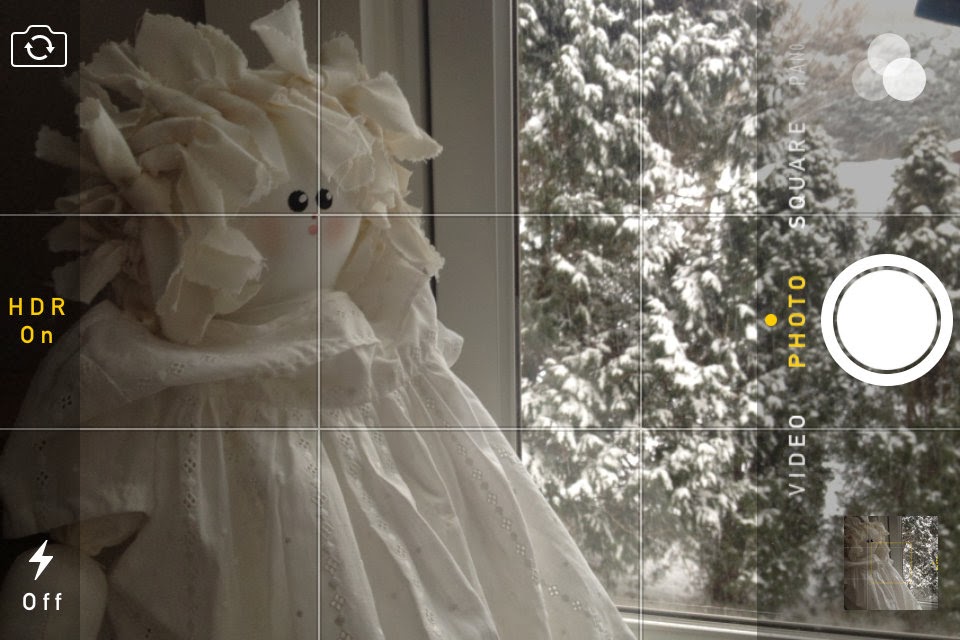
Your iPhone will take even better photos if you treat it like a camera.  Turn on the grid and use the rule of thirds to compose an interesting photo putting the subject or an interesting area of focus somewhere other than smack in the center.

Set HDR On (on the top of your screen when you compose a photo) especially outdoors with a blue sky and a subject that may be shadowed.

Should I use a flash?
That depends… I’m not going to go into a whole photography class here, but if a subject is in a shadow use a flash. Better yet, take the photo so that the subject’s face has natural light and isn’t in the shadows.

I just took a photo on my phone, what should I do with it?
Email it right away!  When you email a photo it is very important to send the highest resolution photo possible.  On an iPhone select “Actual Size” when emailing a photo.  Don’t edit the photo; send what you have, we may want to crop or edit it for different uses.

I have photos on my camera, what should I do with them?
Upload your photos to your computer.  Once on your computer you can email them to the photo master (person responsible for collecting photos).  As an organization you should have someone responsible.  If the organization has regular photographers then create a Dropbox or other shared folder to share lots of photos easily.  Always email a photo at full resolution and as attachments (rather than inline).  This may mean that you can only send one or a few photos at a time.  Thumbnail photos will be of little use to showcase an organization's works.

Should I keep copies of all the photos I send to you?
You are welcome to keep your photos, but for our purposes, once the photo master has acknowledged that receiving your photo and it’s sufficiently high resolution you may do whatever you want with your copy.


Hummingbird Impatience

A much more obliging photographer's model
I pressed more tightly against the side of the house hoping to appear invisible to incoming hummingbirds. Wearing a green sweatshirt and shorts as my camouflage— perhaps I would look like a tree, albeit a tree with glasses holding a camera—I was nestled into a small patch of shade. I held my camera steady, not quite at eye level and heard the unmistakable sound of tiny motor droning overhead. I caught the shadow of the hummingbird on the deck in front of me and just as I lifted my camera, the shadow darted away. This was going to be more difficult than I anticipated.

We had become enamored with hummingbirds since observing them enjoying sugar water from a friend’s hummingbird feeder. So enamored in fact, that the next day I ordered one myself and as soon as it arrived suctioned it to the window, filled it homemade nectar and sat down to await the arrival of flocks of hummingbirds.

I waited. Nothing. My husband and I waited together. Nothing.

“Maybe they will feed in the morning,” my husband offered hopefully.

That night he read late into the night, googling all he could find on the Internet about hummingbirds. The red of the feeder would attract them. They migrated from New England to points south anywhere from July to September. They needed to put on weight before starting their long flight and our feeder wouldn’t delay beginning their journey.
When I awoke, the first words I heard were, “maybe they have already migrated.”
All that day we watched out the window, hoping one straggler would still venture by our feeder. Just when our vigilance was beginning to wane we heard a loud buzzing overhead and watched in awe as a hummingbird first hovered above, then set down upon our feeder and dipped in his beak for a long drink of homemade nectar.

I was hooked and instantly sought to catch the hummingbird in a photograph. The first few shots through the window were easy to take, but sadly, the dirt encrusted on my windowpane was far more visible than the tiny bird hovering through the glass. I tried different times of day with the sun at different angles, but none captured the whimsy of the hummingbird.

Thus I began sitting outside, near the feeder, as even with a zoom lens the tiny stature of the bird required me to be quite close if I had any chance of it filling my camera frame. Not surprisingly the hummingbirds were keenly aware of my presence every time I so much as twitched.

 I watched as the sunlight slowly started sliding towards my shady territory. Soon my foot was bathed in sun and the light and warmth continued to spread up my leg and my torso, until I wished I had chosen something other than a heavy sweatshirt as camouflage. I felt large beads of sweat form on my back, yet still I waited quietly for the return of my petite funny friend. Whenever I heard the loud drone above, I froze in place, hardly breathing. The hummingbird would alight on the feeder and just as I raised my camera, would zoom away as quickly as it had arrived.

I tried holding my camera in place, but between its heft and the heat of the sun I soon grew impatient and set it down in my lap. As if the hummingbird knew I was no longer at the ready, he darted in for a quick sip and darted away in the time it took me to lift my camera to eye level. After what felt like an hour sweating in the sun, but was likely no more than 15 minutes, I decided to create a photo memory. The next time the hummingbird came by, I didn’t move a muscle, just studied his feathers and beak and his red collar and created my own mental image of my tiny, feathered friend.

Winter Art


Snow Laden Tree
Waiting for footprints
Morning by the street


Sun begins its work
Snow sculptures, icicles dripping from rooftops, branches laden with snow—winter art’s appeal stems from its fleeting nature.  

The trees stood as a blank canvas as the snow began to quietly fall last night.  Through the darkness, each snowflake fell upon the landscape, some balancing carefully on slender branches, others covering rocks and roots. 

The installation lasted no more than several hours after dawn. A brief early morning viewing until the sun's rays dissolved the snow’s delicate grip and the showing closed, captured only in photos and in memory.

iPhoto versus Picasa 2011 Comparison

Making a comparison between iPhoto and anything non-Mac will sound like heresy to Apple fanatics, yet as a Picasa user of many years I was intrigued by how iPhoto would compare to Picasa as I moved from Windows to Mac.

I tried out both iPhoto and Picasa on my MacBook Pro. As a Picasa user, I was more familiar with the Picasa interface, but found after a week of using iPhoto regularly I found it easy and fun to use.

Some of the features where I noticed a significant difference between the two products were:

Facial recognition
Not only is Picasa’s facial recognition far more accurate than iPhoto facial recognition, it is faster, has a better user interface (which totally surprised me) and has fun extras.

The downside of Picasa’s facial recognition is that there seems to be a bug using both Picasa and contacts—some of my contacts occasionally disappear from my iPhone contacts list. A few postings on-line indicate that’s the problem, but I haven’t found how to remedy.

Face Movie
I love the face movie feature in Picasa. You can make a movie from the face tags of one person and Picasa (most of the time) adjusts the size, position and angle of the photo so the faces melt from one to the next. Yes there are plenty of bugs still in it, but for no work on the user’s part it’s pretty cool.

Organization
This is personal preference, but I like to see the file hierarchy of my photos.

Touchups
iPhoto wins on touchups— it is far easier (requires just one click, not two) and the end product is far more appealing when removing blemishes, stray hairs, wrinkles and such from faces in iPhoto.

Product Creation
iPhoto provides a direct, simple connection to make cards, calendars and other product. Picasa connects with multiple on-line providers where you can make an array of products at many different price points. It’s not as integrated, but it allows more choice.

Speed 
Here Picasa wins hand down. Managing over 50,000 photos on my Mac is far faster in Picasa than in iPhoto.

Fit and Finish
iPhoto looks better and integrates gestures and other features well.

In sum, both are excellent and fun to use. If you are already familiar with one of the products it is likely not worth the time to learn a new product. But if you’re considering whether you’ll be able to move to a Mac and still use Picasa, the answer is definitely yes. And if facial recognition is critical to your photo organization then you will likely be happier with Picasa.